
Shield360 › Products › Security
Security module · Discover it
Find shadow AI.
Stop the data leaving.
Every AI tool and account by person and computer, and one data-protection policy wherever AI meets your data.
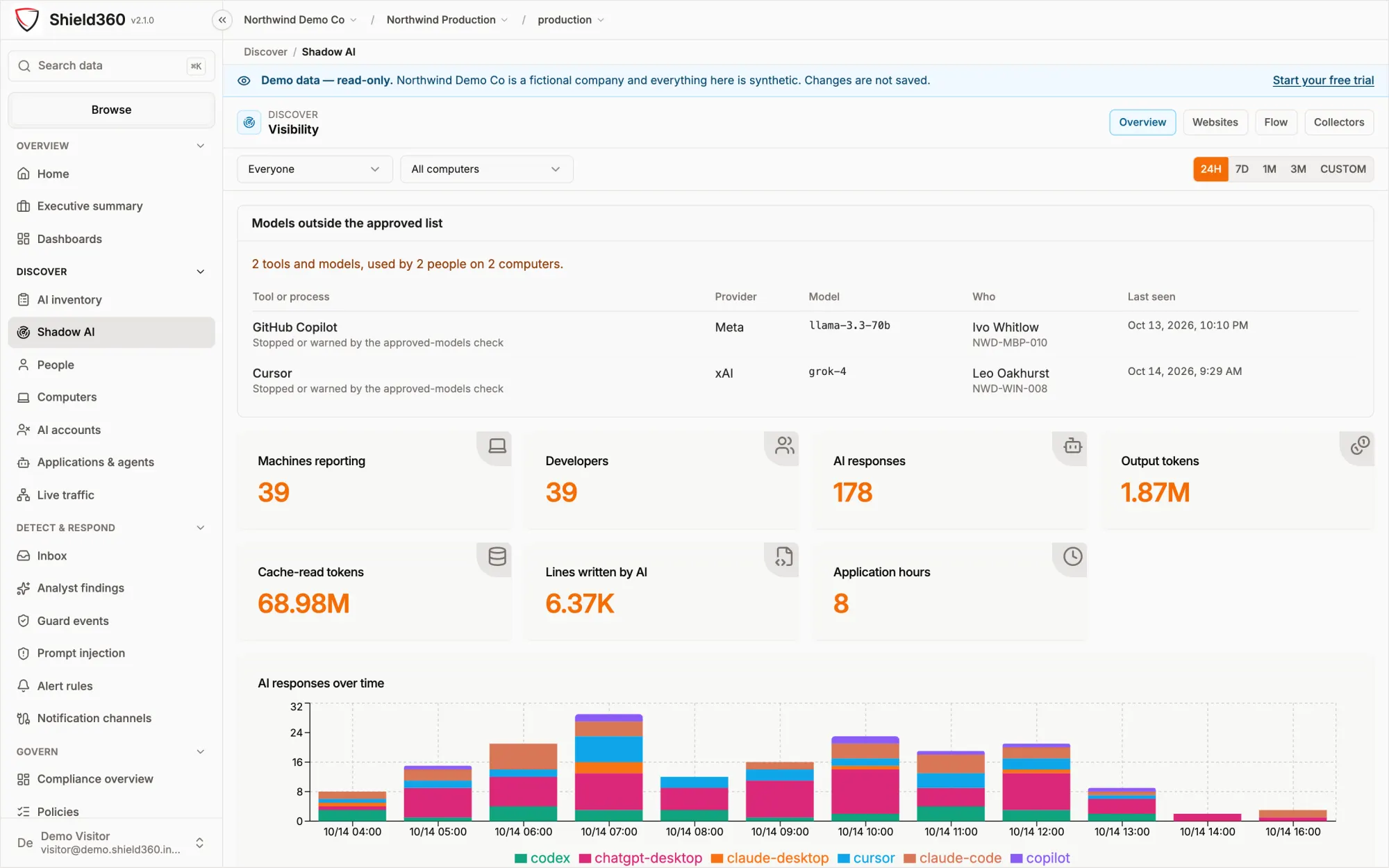
One of four modules of the Shield360 AI Control Plane. Take it alone, or with Compliance as the Governance bundle.
See the four modulesCapabilities
Everything AI touches, seen and governed.
Discovery needs no proxy and no root certificate. Enforcement happens at the point of use, and on the wire only where you route traffic through the AI proxy.
Shadow AI discovery
AI tools, models and sites in use, by person and computer, found by the collector without a certificate, a proxy change or a listening socket.
Collector · macOS, Windows, LinuxPersonal AI accounts
Personal plans such as Claude Max, ChatGPT Plus and Cursor Pro told apart from the company’s own seats. A personal address is shown masked.
AI account identityAI inventory
Tools, models, vendors, keys, agents and MCP servers built from observed use, each with an owner, purpose, risk rating and a decision that expires.
Shared with every moduleBrowser extension
Allows, warns about or blocks the AI sites on its list. On eleven AI chat sites it warns about, masks or blocks a prompt carrying a secret or personal data before it is sent.
Managed Chrome and EdgeAI proxy
Applications, SDKs and LiteLLM point their base URL at it. It refuses unsanctioned providers, warns on or refuses unapproved models, and applies the data policy. Local, in a container or hosted.
Optional · no root certificateCoding-agent hooks
In Claude Code, Cursor and Codex: warn on or block prompts and secret files, detect prompt injection, enforce sequence policies, and optionally fail closed.
Installed by the collectorMCP gateway
Each agent holds its own token, of which only a hash is kept. Grants deny by default, can expire and are read on every call; refused calls are recorded. In enforced mode every call is checked against the tool's schema and your action policies, recorded, then run; a call that fails any step never reaches the service. Agents query governed data through the data gateway: sensitive fields are masked or denied, and every read is recorded.
Agent accessGuard check API
Your application asks before it sends text to a model: allow, warn or block for prompt injection, secrets and personal data, with a redacted copy. The text is never stored or logged.
POST /api/guard/checkHow it works
Observe. Decide. Enforce. Record.
One organization-wide policy, read by every enforcement point. An environment can override a setting for itself.
-
Observe
The collector reads what AI tools already write about themselves; the extension sees AI websites; hooks run inside coding agents.
- Collector agent
- Browser extension
- Coding-agent hooks
-
Decide
Off, warn, mask or block per kind of sensitive data; allow, warn or block per AI tool; approved models; sequence policies.
- Enforcement policy
- Approved models
- Sequence policies
-
Enforce
At the point of use, and on the wire only for traffic you route through the AI proxy. There is no TLS interception.
- Extension · AI proxy · hooks
- MCP gateway
- Guard check API
-
Record
Every block, redaction and warning is kept for seven years. Alerts route through rules and channels; security events go to your SIEM as OCSF.
- Guard events
- Alerts
- SIEM export (OCSF)
Nothing sensitive is stored unless your organization opts in. What is always kept is the decision, the model, token counts and the kinds of sensitive data found; secrets are scrubbed from anything stored.
In the product
The screens your team will use.
Unedited captures of the public demo. Northwind Demo Co is fictional and every figure is synthetic; open the demo to click through them yourself.
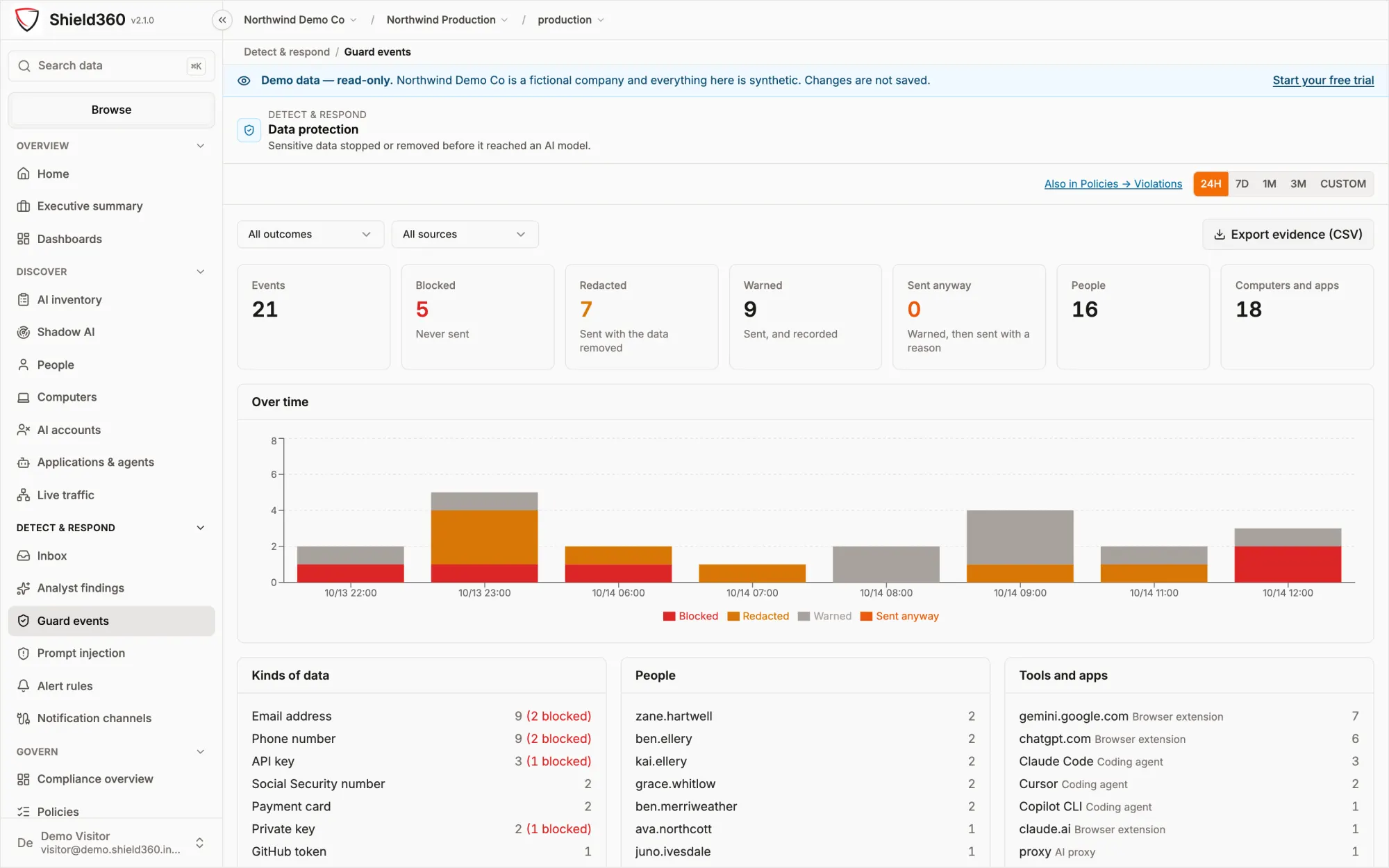
Guard events
Every decision, with the kind of data and where it came from.
Blocked, redacted, warned and sent anyway, by person, kind of data and the tool it came from: the browser extension, a coding agent or the AI proxy. Export the evidence as CSV for any window.
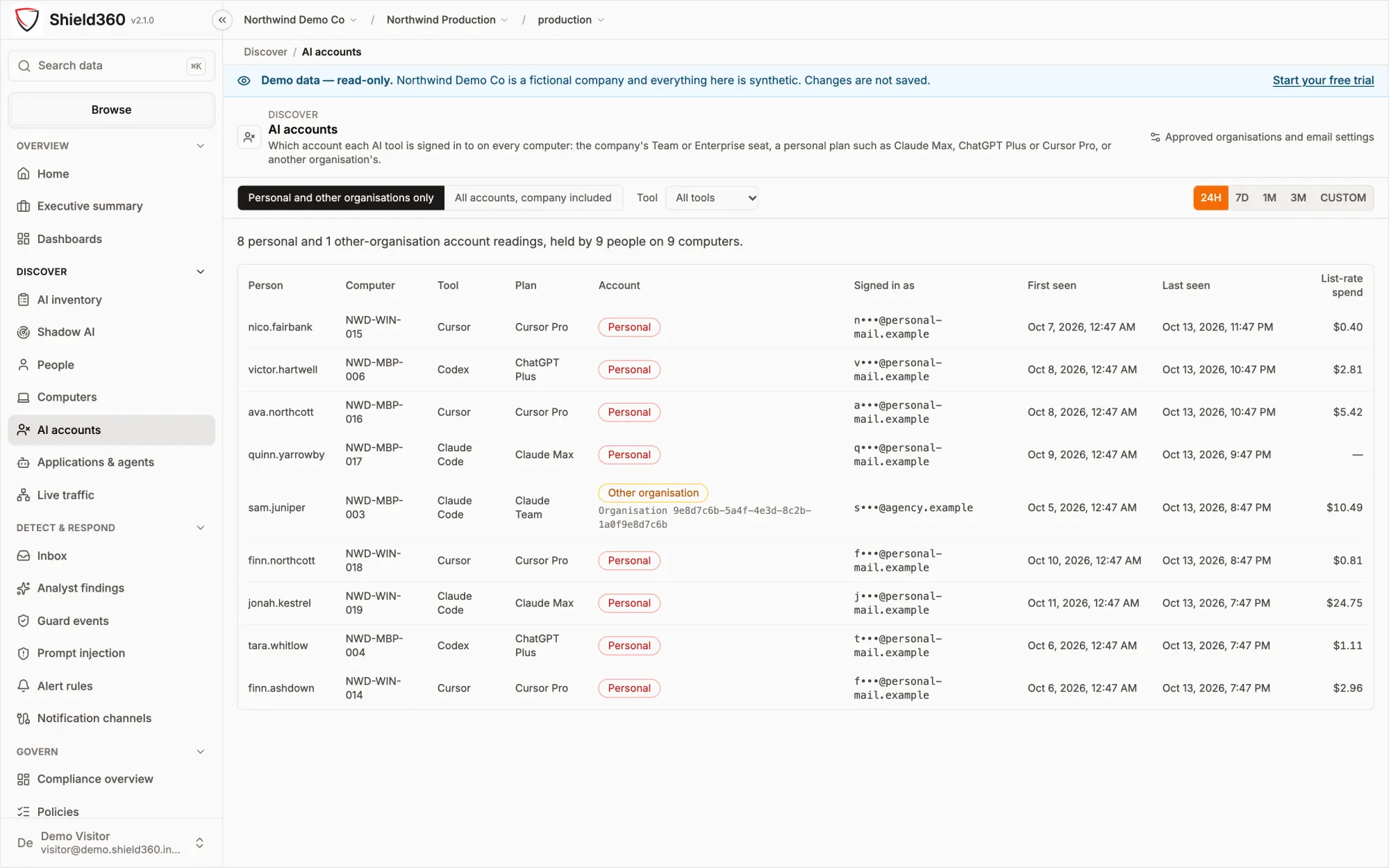
AI accounts
Personal accounts, told apart from company seats.
Which AI accounts are signed in on each computer, and whether each is the company’s Team or Enterprise plan, another organization’s, or a personal plan such as Claude Max or ChatGPT Plus.
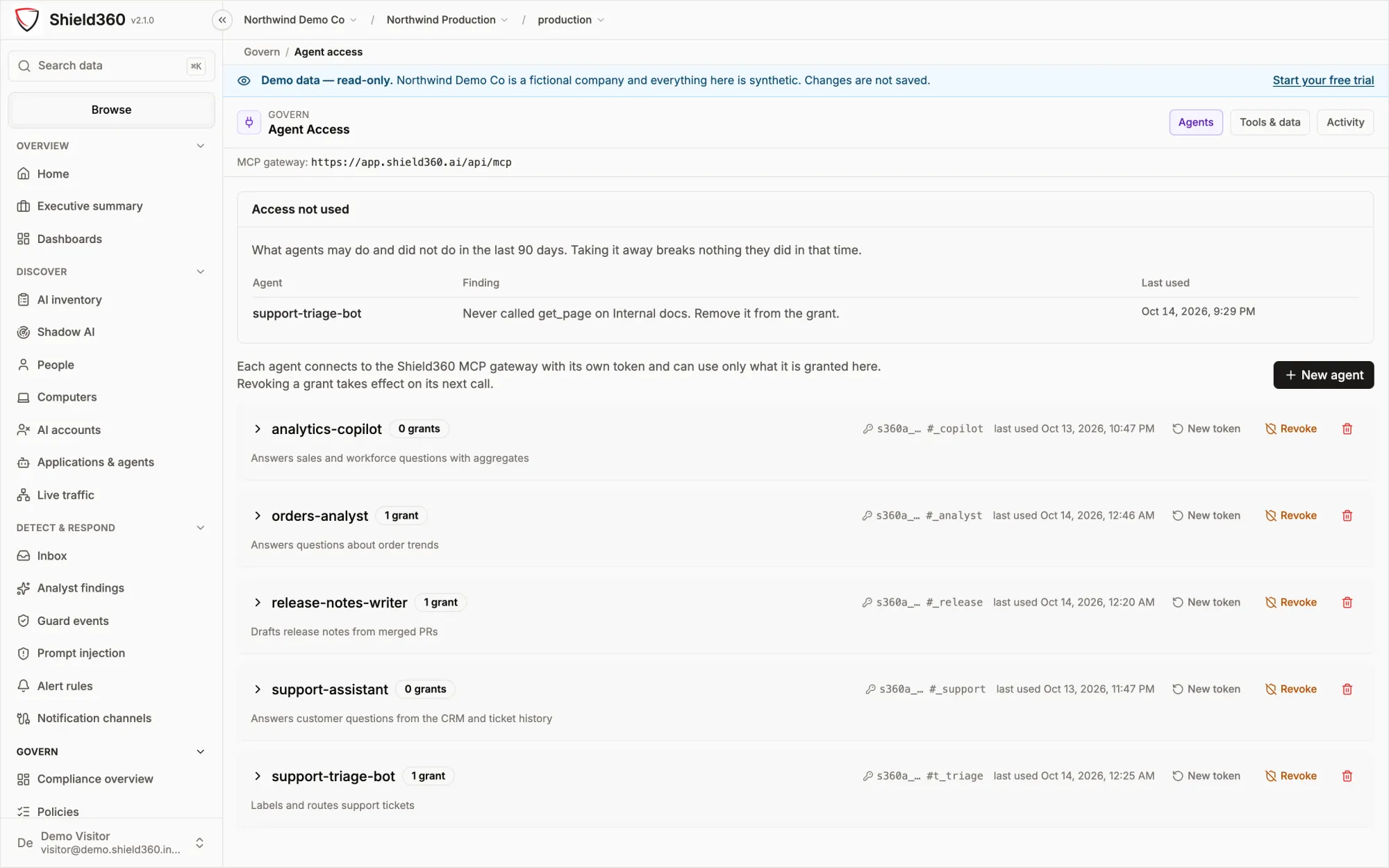
Agent access
An identity and a scope for every agent.
Each agent reaches MCP tools, documents and contexts through the gateway with its own token. Grants are read on every call, so revoking one applies to the next request, and refused calls are recorded.
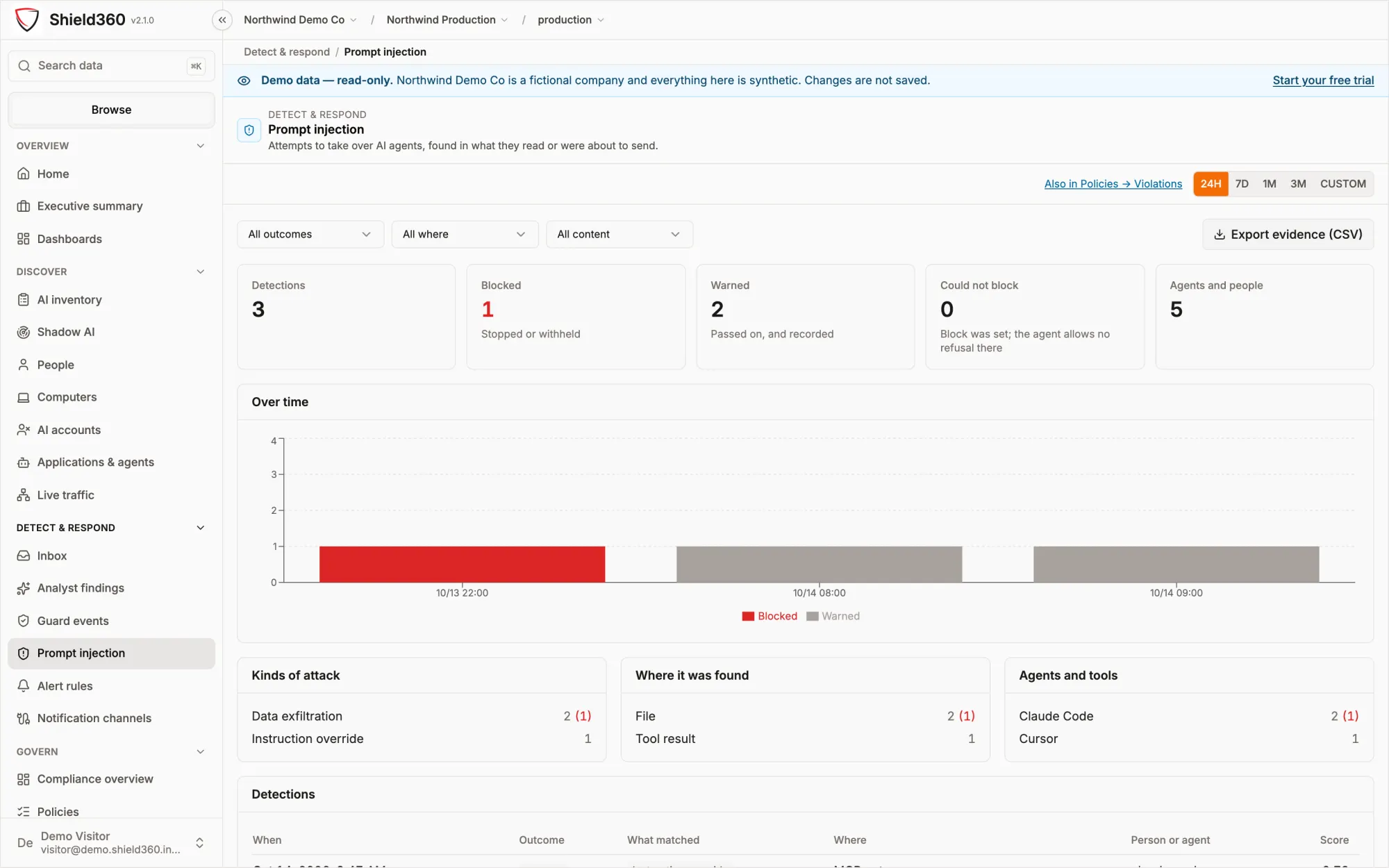
Prompt injection
Caught where it lands.
Text written to take over an agent, found in prompts, files, tool results and tool descriptions: in coding agents, the AI proxy and the MCP gateway, and by the guard check API. Detection is heuristic, so treat it as one layer alongside least-privilege grants.
Built to be checked
Built in, not bolted on.
Each of these is built into the product, not left to a setting.
No root certificate Discovery needs no certificate and no proxy changes, on any machine.
Deny by default An agent reaches only the tools, documents and contexts it was granted.
Never stored Text sent to the guard check API is not stored or logged; only the decision is recorded.
7 years Retention of every block, redaction and warning, enforced by the database.
Does the Security module need a proxy or a root certificate?
No. Discovery comes from the collector, which installs no certificate, changes no proxy setting and opens no listening socket. The AI proxy is optional: applications reach it by base URL, so it needs no root certificate either, and only traffic you route to it passes through it.
Which AI sites does the browser extension check prompts on?
Eleven: ChatGPT, Claude, Gemini, Microsoft Copilot, Microsoft 365 Copilot, Perplexity, Mistral, DeepSeek, Grok, Meta AI and Poe. On those it can warn about, mask or block a prompt carrying a secret or personal data before it is sent. The other AI sites on its list are allowed, warned about or blocked. It runs in managed Chrome and Edge.
What about an internal app that calls a model directly?
It is covered when it calls the model through the AI proxy, or asks the guard check API before it sends the text. The browser extension sees only the sites on its list. There is no TLS interception; other AI use is still discovered and reported.
Is the text of a prompt stored?
Not unless your organization opts in. The decision, the model, token counts and the kinds of sensitive data found are kept; prompt and response content is off by default, and an environment can only store less than its organization. Text sent to the guard check API is never stored or logged.
Can the Security module be taken on its own?
Yes. Security, Finance, Compliance and Developer are modules of one platform, taken singly or together; Security and Compliance together are the Governance bundle. The AI inventory, alerting and the audit log come with every module.
Related resources
Go deeper.
 SolutionFor the CISOExposure, controls, agent access and the structural assurances.Read the page
 ArchitectureWhat crosses the boundaryComponents, data flows, what listens and what leaves a machine.Read the architecture
 DocsEnforcement policyOff, warn, mask or block per kind of sensitive data; allow, warn or block per AI tool.Read the docs
See it on your own question
See every AI tool in your organization.
A working session on the live product, not a generic demo. We say plainly what Shield360 can and cannot answer.
- A map of the gap Where your visibility or control is missing.
- The evidence it needs Which signals, systems and people answer the question.
- A bounded evaluation A scope your team can review, limits stated up front.
Start a conversation
Booked through cal.com. Pick a starting point, or just a time.
Book a briefingOr start from a question